
Key takeaways
- Smart smoke and CO detectors that fit existing 120V alarm wiring harnesses, with adapter plugs, hardwired interconnect, voice alerts and app alerts compared.
As an Amazon Associate I earn from qualifying purchases. This post may contain affiliate links at no extra cost to you.
Homes built with wired alarm boxes already carry the hardest part of the job in the ceiling: a junction box, a hot wire, a neutral wire and, in most houses built after the early nineteen nineties, an orange interconnect wire that links every alarm together. The question that follows is not whether to use that wiring, but which modern smart alarm fits it without a rewiring project. The best smart smoke and CO detectors for existing 120V alarm wiring harnesses are the models that ship with adapter plugs or quick-connect harnesses matching the common three-wire connectors already in those boxes, that keep the wired interconnect working, and that add phone alerts and spoken location announcements on top of the hardwired link. This guide compares seven such models, all of them hardwired combination smoke and carbon monoxide alarms, and explains how to match each one to the harness already in your ceiling.
A harness is simply the plug and pigtail assembly that connects an alarm to the house wiring. In the First Alert and BRK world, that assembly has been stable for years: a quick-connect plug with black, white and orange leads, plus adapter plugs that bridge older connector shapes to newer alarms. Kidde uses a similar quick-connect approach with its own plug shape, and the maker lists compatibility charts that show which of its models share a harness. Google Nest Protect ships with its own 120V connector and three wire connectors in the box. The practical point is that a swap is usually a matter of turning off the breaker, unplugging the old alarm, confirming the wire colors and the connector shape, and plugging in the new one. Where the connector differs, the adapter plugs included with several models below close the gap. Where the house has no orange interconnect wire, the wireless interconnect in several of these alarms still lets units sound together.
The seven alarms in this guide were picked because each one is a hardwired combination smoke and carbon monoxide alarm that the maker lists as compatible with standard residential 120V wiring, and each one adds a smart layer: app alerts, voice announcements, or both. The lead pick is the wired Google Nest Protect, because its split-spectrum sensor, spoken room-by-room alerts, and wireless interconnect between Protect units make the strongest use of an existing wired box while adding the most useful remote features. The First Alert Onelink Safe and Sound follows closely for homes that want a built-in speaker and Alexa, while the Kidde models suit households that already run Kidde wiring and want a wide interconnect family. Prices are not listed here, and the right choice depends on the harness in your ceiling, the app you already use, and how many rooms need coverage.
Quick verdict
For most homes with existing 120V alarm wiring, the wired Google Nest Protect is the strongest single choice. The maker lists a 120V AC connector in the box, three long-life AA backup batteries, a split-spectrum smoke sensor, a ten-year electrochemical carbon monoxide sensor, and UL 217 and UL 2034 listings. It speaks the room name when it alarms, sends phone alerts through the Nest app, and links to other Protect units over a wireless interconnect, so a wired box in the hallway and a battery unit in a bedroom can still sound together. The trade-off is that its wired interconnect runs over its own wireless link rather than the orange traveler wire, so a mixed house with older hardwired alarms from another maker may not share the wired signal with it.
If the ceiling already holds First Alert or BRK harnesses, the Onelink Safe and Sound is the most direct drop-in. The product page lists adapter plugs included in the box, a 120V hardwired connection, voice alerts that name the location, app alerts through the Onelink Home app, and a built-in Alexa speaker. It interconnects with up to eighteen compatible detectors over the wired link, which matches the way most existing harnesses were installed. The Onelink hardwired model 1042135 is the plainer sibling with the same harness approach, a sealed ten-year lithium battery backup, and HomeKit support, while the Kidde 30CUAR-W brings Wi-Fi app alerts to Kidde harnesses, with the ability to relay mobile alerts for other hardwired Kidde alarms on the same circuit. The Kidde P4010ACSCOAQ-WF adds indoor air quality monitoring for households that want that extra readout. The Kidde KN-COSM-IB and KN-COSM-IBA round out the set as voice-warning wired alarms with replaceable backup batteries, the IBA adding a front-load battery door and a ten-year warranty.
Comparison table
| Product | Key spec | Best for |
|---|---|---|
| Google Nest Protect (Wired 120V) | Split-spectrum sensor; 120V connector; 3 AA backup batteries; UL 217 and UL 2034 | Homes wanting spoken room alerts and app alerts on existing wiring |
| First Alert Onelink Safe and Sound 1039102 | Hardwired 120V; adapter plugs; Alexa speaker; voice location alerts | Direct drop-in on First Alert and BRK harnesses with a speaker |
| First Alert Onelink Hardwired 1042135 | Hardwired 120V; sealed 10-year lithium backup; HomeKit; adapter plugs | Apple households replacing older Onelink or BRK hardwired alarms |
| Kidde KN-COSM-IB | Hardwired 120V; 9V battery backup; voice warnings; interconnect up to 24 devices | Wired Kidde circuits keeping the 9V backup pattern |
| Kidde P4010ACSCOAQ-WF | Hardwired 120V; sealed 10-year backup; Wi-Fi; indoor air quality monitor | Wired Kidde circuits with air quality readouts |
| Kidde KN-COSM-IBA | Hardwired 120V; 2 AA battery backup; voice warnings; front-load battery door | Wired Kidde circuits with easy backup battery swaps |
| Kidde 30CUAR-W | Hardwired 120V; 2 AA backup; Wi-Fi; relays alerts for wired Kidde alarms | Mixed Kidde wired circuits needing one smart relay unit |
How we chose
The starting point for this guide was the harness itself. Every alarm here is a hardwired combination smoke and carbon monoxide alarm, and the maker lists a 120V connection with a plug or connector that fits standard residential junction boxes. Models that only run on batteries were left out, because the keyword is about existing wiring, and a battery alarm does not use the harness at all. Next came the smart layer: each model here offers app alerts, voice announcements, or both, so the alarm does more than sound a horn in the hallway. A model with no remote or spoken features would not belong in a smart-detector guide.
Interconnect behavior was the third filter. A house with existing wiring usually has several alarms on one circuit, and the whole point of that wiring is that one alarm sounding sets off the rest. The First Alert and Kidde models here keep the wired interconnect over the orange traveler wire, and several add a wireless link as well. The Nest Protect links its own units wirelessly. We read the maker pages and manuals to confirm which link each model uses, because a model that only sounds alone would leave a bedroom silent when the basement alarm triggers.
Certifications came next. The models in this guide carry UL listings for smoke and carbon monoxide alarms, and the maker pages list UL 217 and UL 2034 for most of them. We did not treat a listing as a promise about outcomes; it is a statement that the alarm was evaluated against a published standard, and the guide describes it that way. Sensor type mattered too: most models here use a photoelectric smoke sensor with an electrochemical carbon monoxide sensor, a pairing the makers describe as suited to smoldering smoke and to carbon monoxide from fuel-burning appliances. Finally, we looked at practical swap details: adapter plugs, quick-connect harnesses, backup battery type, and whether the alarm can be silenced from the app. Those details decide whether a Saturday swap goes smoothly or turns into a second trip to the hardware store.
Google Nest Protect (Wired 120V)
- Split-spectrum smoke sensor and ten-year electrochemical carbon monoxide sensor
- 120V AC connector included, with three long-life AA backup batteries
- Wi-Fi 2.4 GHz and wireless interconnect between Protect units
- Spoken voice alerts that name the room, plus Nest app alerts
- 85 dB horn and 2-watt speaker
- UL 217 and UL 2034 listed, with a ten-year service life
The wired Nest Protect is the most polished use of an existing 120V box in this guide. The maker lists a split-spectrum sensor that reads smoke at two wavelengths, which the product page describes as a way to tell apart fast-burning and slow smoldering smoke while cutting down nuisance alarms from steam and cooking. The 120V connector in the box attaches to the existing hot and neutral wires, and the three AA lithium backup batteries keep the unit running when the power drops. The unit is round, 5.3 inches across, and it mounts on the existing junction box with the included backplate. Setup runs through the Nest app, where each unit gets a room name, and that name is what the alarm speaks when it sounds, so a hallway alarm can say the smoke is in the kitchen rather than just sounding a horn.
The wireless interconnect is the feature that matters most for multi-room houses. Protect units link over their own wireless protocol, so one alarm sounding sets off the others, and the app reports which room triggered. That link works alongside the wired power connection, though it does not carry the signal over the orange traveler wire to alarms from other makers. In a house that is already all Nest, that is not a drawback. In a mixed house, the practical fix is to replace the whole circuit with Protect units or to keep the older alarms on a separate part of the house. The app also runs a monthly self-check, reports low batteries, and keeps a history of events, which helps when a household wants to know whether a chirp at night was a low battery or a sensor fault.
Pros: Spoken room-by-room alerts; strong app with event history; split-spectrum sensing; easy swap onto a 120V box.
Cons: Wireless interconnect does not use the orange traveler wire; needs the Nest app for full features.
First Alert Onelink Safe and Sound 1039102
- Hardwired 120V with adapter plugs included for existing harnesses
- 85 dB horn with voice alerts that name the location
- Onelink Home app alerts for smoke and carbon monoxide events
- Built-in Alexa speaker with AirPlay 2 support
- LED nightlight with automatic brightness
- Interconnects with up to 18 compatible detectors
The Safe and Sound is the most direct answer to the harness question, because the maker built it around the swap itself. The product page states that adapter plugs are included so the alarm can connect to the existing First Alert or BRK harness without rewiring, and the install guide walks through the black, white and orange wires in the junction box. That is the whole job for most houses: breaker off, old alarm off the bracket, adapter plug on, new alarm on the bracket, breaker on, then setup in the Onelink Home app. The alarm also carries a built-in Alexa speaker, which turns a ceiling device into a room speaker, and an LED nightlight that brightens automatically in the dark.
Voice location is the safety feature that stands out. When the alarm sounds, it speaks the type of hazard and the room, which helps a household tell a kitchen smoke event from a basement carbon monoxide event without walking toward the sound. The app sends alerts to a phone or tablet when the household is away, and the unit interconnects with up to eighteen compatible detectors, with a limit of twelve smoke alarms, over the wired link. The speaker and the smart features make this the heaviest and most feature-rich unit here, and households that do not want a microphone and speaker in a bedroom may prefer the plainer Onelink hardwired model below.
Pros: Adapter plugs included for a fast swap; Alexa speaker and nightlight; voice location alerts; wired interconnect up to 18 units.
Cons: Speaker and microphone may not suit every bedroom; larger and heavier than a plain alarm.
First Alert Onelink Hardwired 1042135
- Hardwired 120V with sealed ten-year lithium battery backup
- Photoelectric smoke sensor and electrochemical carbon monoxide sensor
- Wi-Fi 2.4 GHz with Apple HomeKit support
- Voice alerts naming the hazard type and location
- Onelink Home app alerts and Alexa status checks
- Adapter plugs included; UL 217 and UL 2034 listed
The Onelink 1042135 is the straightforward hardwired smart alarm in the First Alert line, and it fits the harness story just as directly as the Safe and Sound. The maker lists a hardwired AC connection with a sealed ten-year lithium battery backup, so there is no backup battery to change during the life of the alarm, and adapter plugs are included to mate with the existing connector. The photoelectric smoke sensor and electrochemical carbon monoxide sensor are the standard pairing across this guide, and the unit interconnects with other BRK and First Alert hardwired alarms over the wired link. Setup runs through the Onelink Home app, and the unit joins Apple HomeKit, so an iPhone household can see alarm status in the Home app and ask Siri about it.
Where this model earns its place is in the middle of the range: it has the app alerts, the voice location announcements, and the sealed backup battery, without the speaker and nightlight of the Safe and Sound. That makes it a better fit for bedrooms and hallways where a speaker is unwanted, and for households that want every alarm on the circuit to match. The sealed battery is a real convenience, because a hardwired alarm with a replaceable backup battery will chirp for a fresh cell at some point, usually at night, while this one is designed to run its full service life without that chore. The trade-off is that the battery cannot be swapped if it runs low early, and the whole unit would need replacing at end of life, which the maker lists as ten years.
Pros: Sealed ten-year backup battery; HomeKit support; adapter plugs for easy swap; voice location alerts.
Cons: No speaker or nightlight; sealed battery cannot be replaced separately.
Kidde KN-COSM-IB
- Hardwired 120VAC with 9V battery backup
- Ionization smoke sensor and electrochemical carbon monoxide sensor
- Voice warning system announcing fire, carbon monoxide, low battery, or hush activation
- Smart Interconnect with up to 24 Kidde devices
- Quick-connect plug with eight-inch pigtails
- 85 dB horn at 10 feet; UL listed; five-year warranty
The Kidde KN-COSM-IB is the wired replacement that keeps the older 9V backup pattern, and it fits a house whose existing harness is a Kidde quick-connect plug. The maker lists a hardwired 120VAC connection with a 9V battery backup, an ionization smoke sensor, an electrochemical carbon monoxide sensor, and a voice warning system that announces fire, carbon monoxide, low battery, or hush activation. The Smart Interconnect links up to twenty-four Kidde devices, with eighteen able to initiate an alarm, and the quick-connect plug with eight-inch pigtails fits the existing Kidde harness, so the swap is a plug job on a circuit that already has Kidde boxes. The unit is designed so the battery door will not close until the battery is fitted, which removes the risk of mounting a unit without its backup cell.
The ionization sensor is the difference from the photoelectric models in this guide. The maker describes it as suited to fast flaming fires, with smaller particles, while the photoelectric models are described as suited to smoldering smoke. A house replacing expired alarms can mix this model with photoelectric models on other floors for broader coverage. The five-year warranty is shorter than the ten-year class in this guide, and the 9V backup cell will need replacement on the maker's schedule, which is a small chore compared with the sealed packs elsewhere. For a house that already stocks 9V cells for its old alarms, this model keeps the maintenance routine familiar, and the voice warning removes confusion about which hazard the alarm is sounding.
Pros: Voice warnings for four conditions; wired interconnect up to 24 devices; battery door safety design; familiar 9V backup.
Cons: Five-year warranty is shorter than rivals; 9V backup cell needs periodic replacement; no Wi-Fi or phone alerts.
Kidde P4010ACSCOAQ-WF
- Hardwired 120V with sealed ten-year lithium battery backup
- Photoelectric smoke sensor and electrochemical carbon monoxide sensor
- Indoor air quality monitor for temperature, humidity and total volatile organic compounds
- Wi-Fi with Kidde app real-time mobile alerts
- Voice alerts and hardwired interconnect up to 24 Kidde devices
- UL 217 and UL 2034 listed; 85 dB horn
The P4010ACSCOAQ-WF is the same hardwired Wi-Fi alarm as its sibling above, with an indoor air quality monitor added. The maker lists monitoring for temperature, relative humidity and total volatile organic compounds, alongside the photoelectric smoke sensor and electrochemical carbon monoxide sensor. The air quality readings appear in the Kidde app, and the unit sends mobile alerts for smoke and carbon monoxide events. It wires into the same 120V Kidde harness, carries the same sealed ten-year lithium battery backup, and interconnects with up to twenty-four Kidde devices over the wired link. The voice alarm speaks the hazard, and the unit works with Google Assistant and Alexa for status checks.
The air quality monitor is a convenience feature, not a life-safety sensor, and the maker is clear that the indoor air quality readings are not a substitute for the smoke and carbon monoxide sensors. For a household that already checks humidity or air quality, having the readout on the ceiling alarm removes the need for a separate monitor in the same room. For a household that does not care about those readings, the plainer Kidde models in this guide give the same alarm features for a simpler setup. The harness question is identical for both: if the ceiling holds a Kidde quick-connect plug, this unit drops in; if it holds a First Alert plug, the household should pick a First Alert model instead.
Pros: Adds air quality, temperature and humidity readouts; Wi-Fi app alerts; same wide Kidde interconnect.
Cons: Air quality readings are extra, not life-safety sensing; needs the Kidde app for full value.
Kidde KN-COSM-IBA
- Hardwired 120VAC with 2 AA battery backup
- Ionization smoke sensor and electrochemical carbon monoxide sensor
- Voice message system announcing fire or carbon monoxide warnings
- Smart Interconnect with up to 24 Kidde devices
- Peak level memory for carbon monoxide at 100 ppm or higher
- Front-load battery door; Hush feature; 85 dB horn; ten-year limited warranty
The Kidde KN-COSM-IBA is the close sibling of the KN-COSM-IB, with two changes that matter for a harness swap: the backup battery is two AA cells instead of a 9V cell, and the warranty is ten years instead of five. The maker lists a hardwired 120VAC connection with two AA battery backup, an ionization smoke sensor, an electrochemical carbon monoxide sensor, and a voice message system that announces fire or carbon monoxide warnings. The Smart Interconnect links up to twenty-four Kidde devices, and the peak level memory announces when carbon monoxide at 100 ppm or higher was detected since the last reset. The front-load battery door lets the household swap the backup cells without removing the alarm from its bracket, and the Hush feature silences a nuisance alarm for a period.
The AA backup pattern is the more common one in modern houses, and the cells are easy to keep on hand. The ten-year limited warranty matches the service life, which makes this model the better long-term pick of the two Kidde wired siblings for most households. The ionization sensor suits fast flaming fires, and the voice warning speaks the hazard clearly. The trade-off is the same as its sibling: no Wi-Fi and no phone alerts, so a household that wants app notifications should look at the Kidde 30CUAR-W in this guide. For a wired Kidde house swapping onto existing harnesses with a familiar battery pattern and a ten-year warranty, the KN-COSM-IBA is a solid choice.
Pros: Ten-year warranty; front-load battery door; voice warnings; peak level memory; AA backup cells.
Cons: No Wi-Fi or phone alerts; ionization sensor differs from the photoelectric models here.
Kidde 30CUAR-W
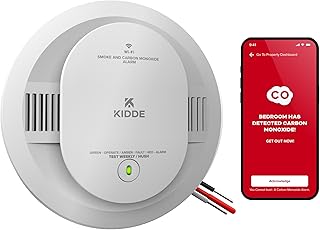
- Hardwired 120V AC with 2 AA backup batteries
- Photoelectric smoke sensor and electrochemical carbon monoxide sensor
- Wi-Fi 2.4 GHz with Kidde app real-time notifications and phone hush
- Voice alerts and hardwired interconnect up to 24 Kidde devices
- One smart alarm relays mobile alerts for existing hardwired Kidde alarms
- UL 217 and UL 2034 listed; ten-year limited warranty
The Kidde 30CUAR-W solves a different problem from the rest of this guide: a house full of older hardwired Kidde alarms that work fine but cannot send phone alerts. The maker lists a feature where one 30CUAR-W on the circuit relays mobile alerts for the other hardwired Kidde alarms connected to it, so a household can add a single smart unit and get app coverage for the whole wired network. It is itself a full combination alarm, with a photoelectric smoke sensor, an electrochemical carbon monoxide sensor, a 120V connection, two AA backup batteries, Wi-Fi, voice alerts, and the Kidde app with real-time notifications and phone hush. It also works with Alexa and Google Home for status checks.
For a harness swap, the 30CUAR-W fits the standard Kidde quick-connect plug and junction box, and its two AA backup batteries are replaceable, which some households prefer over a sealed pack because a dead backup cell can be swapped without replacing the alarm. The relay feature is the reason to pick it over the Kidde P4010ACSCOAQ-WF: if the house already has five good Kidde hardwired alarms, one 30CUAR-W makes the circuit smart, while five P4010ACSCOAQ-WF units would be a bigger project. The trade-off is the replaceable AA backup, which will need fresh cells on the maker's schedule, and the fact that the relay only covers Kidde alarms on the same wired interconnect.
Pros: Relays app alerts for older wired Kidde alarms; replaceable AA backup; phone hush; wide interconnect.
Cons: Relay covers Kidde alarms only; AA backup cells need periodic replacement.
Buying guide
Start with the harness in the ceiling, because that decides the shortlist before any feature comparison. Turn off the breaker for the alarm circuit, remove one old alarm from its bracket, and look at the plug. A First Alert or BRK plug with black, white and orange leads points to the Onelink and SC5 models, which ship with adapter plugs for the common connector shapes. A Kidde quick-connect plug points to the Kidde models, which share a plug family across their hardwired range. A Nest Protect connector points to the wired Protect. Take a photo of the plug and the wire colors before shopping, and compare it with the install guide for the model you are considering. If the plug shapes do not match and no adapter is listed, do not force the connection; pick a model from the same maker family as the existing harness, or ask an electrician to fit the correct harness.
Count the alarms on the circuit next. The makers list interconnect limits, usually eighteen compatible detectors with a limit of twelve smoke alarms for First Alert, and up to twenty-four Kidde devices with eighteen able to initiate. Most houses have between three and eight alarms, so the limits rarely bind, but a large house with a finished basement and an attic room should still count before ordering. All interconnected alarms must sit on the same fuse or breaker, and the total interconnect wire run should stay under one thousand feet, which the install guides list as the limit. If the house has alarms on two different circuits, treat them as two separate networks unless a wireless interconnect bridges them.
Check the orange wire. In a wired interconnect, the orange traveler wire carries the signal between alarms, and the install guides describe connecting it with a wire nut to the orange lead on the new alarm. If the house has no orange wire, the alarms still work as single units on their own power, but they will not sound together over the wire. In that case, pick models with a wireless interconnect, such as the Nest Protect or the SC5, so the rooms still sound together without new wiring. If the house has the orange wire but some alarms are a different brand, read the compatibility notes carefully: First Alert lists its hardwired alarms as interconnecting with BRK models, Kidde lists its own family, and mixing brands on one traveler wire is not something the makers list as supported.
Backup battery type is the next decision. Sealed ten-year lithium backup batteries, found on the Onelink 1042135 and the Kidde P4010ACSCOAQ-WF, remove the battery chore for the life of the alarm. Replaceable AA backup batteries, found on the wired Nest Protect, the Kidde KN-COSM-IBA and the Kidde 30CUAR-W, can be swapped when they run low, which some households prefer. The 9V backup on the Kidde KN-COSM-IB is a third pattern, and it is worth knowing which one the house already uses so the maintenance routine stays familiar. Whichever type you pick, note the install date on the alarm with a marker, because every alarm in this guide has a ten-year service life, and the end-of-life signal will sound when that period ends.
App and voice features should match the household, not the other way around. An Apple household gets the most from the Onelink 1042135 with HomeKit, a Google household from the Nest Protect or the SC5, and a Kidde household from the Kidde app models. Voice location alerts matter most in larger houses, where a bare horn does not say which room triggered. If the household includes people who are deaf or hard of hearing, look at models with a strobe or a strong visual indicator, and remember that a phone alert is a useful extra channel but not a replacement for the audible alarm. Finally, check local code and the maker's instructions for placement: alarms belong in every bedroom, outside each sleeping area, and on every level, and they should sit away from kitchens and bathrooms where steam and cooking smoke cause nuisance alarms. When in doubt about wiring, hire an electrician; the swap is simple, but the circuit must be off and the connections must be secure.
FAQ
Will a new smart alarm fit the plug left by my old hardwired alarm?
In many cases yes, when the new alarm comes from the same maker family. First Alert and BRK alarms share adapter plugs that bridge older connectors to newer models, and Kidde hardwired alarms share a quick-connect plug across their range. The product pages for the Onelink models list adapter plugs included in the box. Before ordering, remove one old alarm, photograph the plug and wire colors, and compare them with the install guide for the new model. If the shapes differ and no adapter is listed, choose a model from the same maker family or ask an electrician to fit the correct harness.
Does the orange interconnect wire still work with a smart alarm?
Yes, for the models in this guide that list a wired interconnect. The First Alert and Kidde hardwired models connect the orange traveler wire with a wire nut, and the install guides describe the same fuse or breaker rule and the one-thousand-foot wire limit that older alarms used. The Nest Protect is the exception: it powers from the 120V wires but links its own units over a wireless interconnect rather than the orange wire. If the house mixes Nest Protect units with older wired alarms from another maker, the two groups will not share the wired signal.
Do I need Wi-Fi for a hardwired smart alarm to sound?
No. Every alarm here sounds its horn and speaks its voice alert on its own, with or without Wi-Fi, and the hardwired interconnect works without a network. Wi-Fi is only needed for phone alerts, remote hush, and app history. During a power outage, the backup battery keeps the alarm sounding, but the Wi-Fi features pause until power returns. That is normal for this class of alarm, and it is why the audible interconnect matters more than the app.
How do I know when a hardwired alarm has reached end of life?
The makers list a ten-year service life for the alarms in this guide, and each one gives an end-of-life signal, usually a repeating chirp pattern that differs from the low-battery chirp. The product pages describe the signal in the user guide for each model. Writing the install date on the alarm with a marker makes the replacement date easy to check. When the end-of-life signal sounds, the whole unit should be replaced, because the sensors are rated for that period.
Can one smart alarm make my older wired alarms send phone alerts?
Yes, in one case in this guide. The Kidde 30CUAR-W is listed by the maker as relaying mobile alerts for existing hardwired Kidde alarms on the same circuit, so a single smart unit can give the whole wired network an app presence. The other smart models here only send alerts for themselves, so a house that wants app coverage on every room would need a smart unit in each room. Check the relay compatibility list for the exact older models before relying on it.
Conclusion
Existing 120V alarm wiring is an asset, and the right smart alarm handles it that way. The wired Google Nest Protect leads this guide because it pairs a split-spectrum sensor and spoken room alerts with a clean swap onto a 120V box, and its wireless interconnect keeps multi-room houses sounding together. The First Alert Onelink models are the natural choice for houses that already run First Alert or BRK harnesses, with adapter plugs that remove the rewiring step and voice location alerts that name the room. The Kidde Wi-Fi model, the relay-capable 30CUAR-W, gives Kidde-wired houses app alerts without changing the plug family. Match the harness first, count the circuit, confirm the orange wire, and pick the app that fits the household. Do that, and the swap is a short job with a long payoff: the same ceiling boxes, now speaking, alerting a phone, and sounding together across every level of the house.
Related guides
More from Amazon
Programs that pair well with the guide above. Offers and eligibility are set by Amazon and may change.
Collect the home and kitchen items you want in one registry that guests can shop from.
Create a wedding registrySet up recurring deliveries of everyday items on eligible products. Terms and savings are set by Amazon.
Explore Subscribe & SaveFree shipping on eligible items, Prime Video and more. Eligible new members can start with a free trial.
Start a Prime free trialAudiobooks and podcasts to listen to on the go. Eligible new members can start with a free trial.
Try Audible freeAs an Amazon Associate we earn from qualifying purchases.
More ways to save on your next project
Programs that pair well with the guide above. Offers and eligibility are set by Amazon and may change.
A free business account with business pricing and bulk-buying tools for work, shop or home office.
Create a business accountFast, free shipping on eligible items, plus Prime Video and more. Eligible new members can start with a free trial.
Start a Prime free trialAudiobooks and podcasts for the commute, the garage or the kitchen. Eligible new members can start with a free trial.
Try Audible freeA dedicated Amazon storefront for low-price finds. Offers and eligibility are set by Amazon.
Browse Amazon HaulAs an Amazon Associate we earn from qualifying purchases. Using these links costs you nothing extra.




Write Your Review
No reviews yet. Be the first to share your experience!